ADOBE PREMIERE — OFFICIAL PARTNER OF YOUTUBE SHORTS
An easy new way to create YouTube Shorts.
Adobe Premiere on iPhone offers a dedicated space for editing YouTube Shorts with exclusive templates, effects, transitions, and title presets — and you can publish directly to YouTube.
Quickly turn any idea into attention-grabbing content with unmatched speed on a precise, multi-track timeline, studio-quality audio, and generative AI tools.
A timeline built for speed and precision.
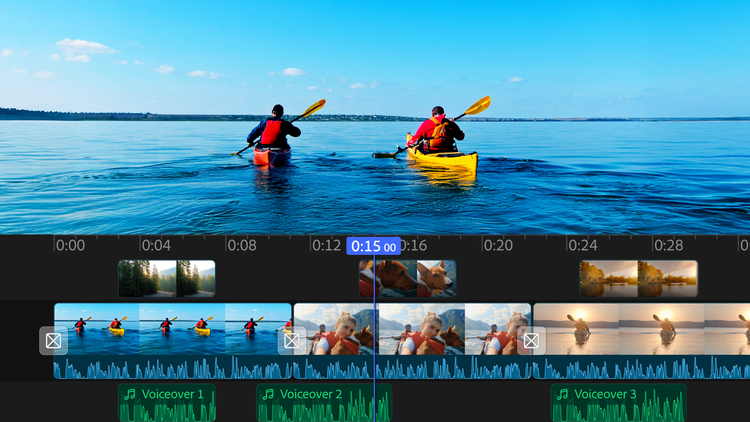
Trim, reorder, and layer clips with no-fuss precision and control in a fluid, multi-track timeline. Apply cinematic color in a tap and easily add animated captions.
Endless ways to create your way.
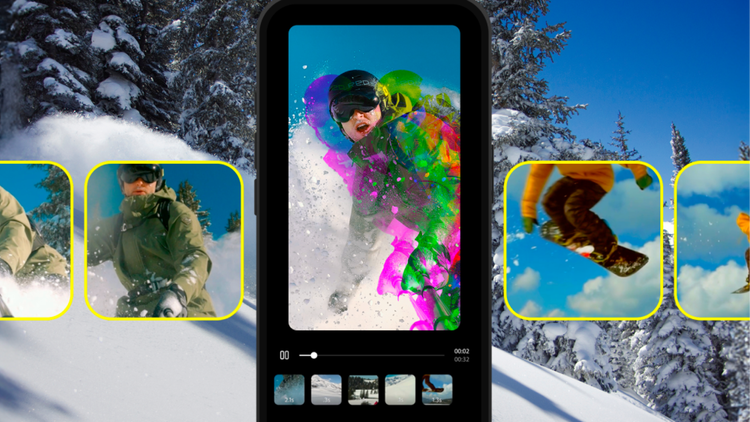
Share videos that pack a punch. Choose from hundreds of thousands of images, videos, stickers, fonts, and more to make your videos pop — or explore new ideas with generative AI right at your fingertips.
No sound studio, no problem.
Achieve studio-grade sound with powerful AI audio tools for crystal-clear voiceovers. And use your own voice to create amazing and perfectly timed sound effects.
style
xl-spacing-bottom
Explore top features in Adobe Premiere on iPhone.
Edit with an unlimited number of tracks.
Overlay clips and organize your content on a multi-track timeline designed for speed and precision.
carousel
Pr-editorial-cards-02
Get super-smooth performance.
Count on stable, high-performance editing — including with 4k footage — using an app built natively on iOS.
carousel
Pr-editorial-cards-02
Quickly generate standout visuals.
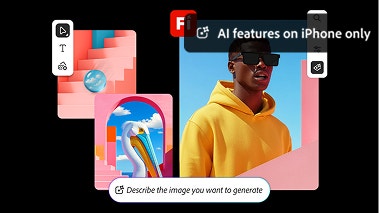
Use features powered by Adobe Firefly AI to generate stickers and images, extend backgrounds, or turn images into clips. You can also help yourself to free creative assets from a massive in-app library.
carousel
Pr-editorial-cards-02
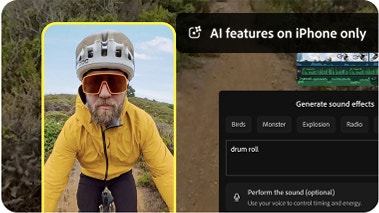
Turn your voice into sound effects.
Create custom sound effects for your videos using the Generate Sound Effects feature. Simply use your iPhone’s mic to capture the timing and inflection you want, and let AI do the rest.
carousel
Pr-editorial-cards-02
Create with confidence.
Adobe doesn’t claim any ownership of your content, and we only train Adobe Firefly generative AI models on content where we have permission to do so.
carousel
Pr-editorial-cards-02
Edit without distractions.
No watermarks, upsell pop-up ads, or clutter. The only time you pay is when you want to use generative AI credits. Enjoy a seamless editing experience that lets you stay focused on your content.
carousel
Pr-editorial-cards-02
background
style
m-spacing-top
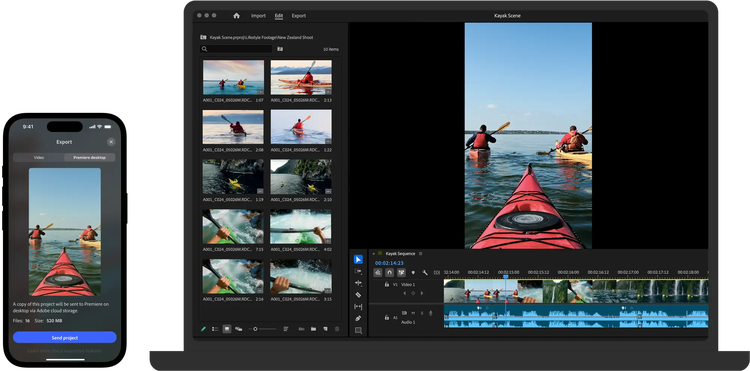
Move seamlessly across the family of Adobe Premiere apps.
Kick off a project on mobile. Then pick up where you left off in the Premiere desktop app to polish it up with advanced tools and creative control.
background
bottom, center, contain
Frequently asked questions
Yes, Adobe Premiere on iPhone is a free, standalone video editing mobile app. You can use all core editing functions and export an unlimited number of videos in 4K resolution with no watermarks in the free version. Generative AI features powered by Firefly use generative credits which can be purchased with a subscription or are included as part of most Creative Cloud plans.
To download and install the app, scan the QR code above or visit the Apple App Store on your device.
Adobe Premiere on iPhone includes images, effects, music tracks, fonts and video assets. You can also generate custom sound effects, stickers, images and more using Adobe Firefly. Generative AI features powered by Firefly use generative credit, which can be purchased with a subscription or are included as part of existing Creative Cloud plans.
Adobe Premiere on iPhone helps you create one-of-a-kind content with AI features like generative video, images, stickers, sound effects, and more. It also includes assistive AI tools like speech enhancement, background removal, and automatic caption creation to help you work faster.

Yes, if you have a paid subscription to Adobe Premiere on desktop, you can import projects and media from Adobe Premiere on iPhone.
Adobe Premiere on iPhone is best for creators who want professional-grade editing on mobile — frame-accurate timeline control, watermark-free exports, and commercially safe AI-generated content, all in a free app. It’s ideal for content creators who also use Adobe’s desktop tools and want a seamless mobile-to-desktop workflow.
Compared to other mobile editors, Adobe Premiere on iPhone offers a more professional editing experience with a multi-track, resizable timeline, unlimited free auto-captions, and watermark-free exports at no cost. Adobe Firefly AI features are commercially safe because Adobe only trains Firefly on licensed content.
Yes, it’s coming soon. Be the first to try Premiere on Android with early access on Google Play. Limited spots available. Join the Android early access.
style
Center, xl spacing, static links
Discover your best work yet.
Create videos that are always a cut above, from anywhere. Experience the power of Premiere on desktop and iPhone with a single subscription.

Speed up your video workflows with Adobe Firefly generative AI.
Visualize shots and effects ahead of the shoot, generate assets missed in production to complement your edit, and eliminate tedious tasks to stay focused on your creative ideas.
You can control how Adobe websites use cookies and similar technologies by making choices below. But note that if you disable cookies and similar technologies entirely, Adobe websites may not function properly.
Cookies are small text files stored by your web browser when you use websites. There are also other technologies that can be used for similar purposes like HTML5 Local Storage and local shared objects, web beacons, and embedded scripts. These technologies help us do things like remembering you and your preferences when you return to our sites, measure how you use the website, conduct market research, and gather information about the ads you see and interact with.
You can make choices in the menu below about what cookies and other technologies you want us to use on Adobe sites when you visit them from this browser. You can always change those choices later by clicking on the Cookie Preferences link at the bottom of the page.
If enabled:
We can improve your experience by tailoring the site and the content to things we think might be of interest
We can better keep track of your preferences — like what language you prefer to use
We will better understand your likely interests so we can provide you more relevant Adobe ads and content on non-Adobe websites and in non-Adobe apps
It will help us improve the performance of our website and those of our partners who use the Adobe Experience Cloud
If disabled:
We won’t be able to remember you from session to session so the experience may not be tailored to your interests
You’ll still have access to the content of the site but certain features that depend on cookies may not function
You’ll still see ads, they just may not be as relevant to you
General information
You can control how Adobe websites use cookies and similar technologies by making choices below. But note that if you disable cookies and similar technologies entirely, Adobe websites may not function properly.
Cookies are small text files stored by your web browser when you use websites. There are also other technologies that can be used for similar purposes like HTML5 Local Storage, web beacons, and embedded scripts. These technologies help us do things like remembering you and your preferences when you return to our sites, measure how you use the website, conduct market research, and gather information about the ads you see and interact with.
You can make choices in the menu below about what cookies and other technologies you want us to use on Adobe sites when you visit them from this browser. You can always change those choices later by clicking on the Cookie Preferences link at the bottom of the page.
If enabled:
We can improve your experience by tailoring the site and the content to things we think might be of interest
We can better keep track of your preferences — like what language you prefer to use
We will better understand your likely interests so we can provide you more relevant Adobe ads and content on non-Adobe websites and in non-Adobe apps
It will help us improve the performance of our website and those of our partners who use the Adobe Experience Cloud
If disabled:
We won’t be able to remember you from session to session so the experience may not be tailored to your interests
We’ll still count your use of our site and services
You’ll still have access to the content of the site but certain features that depend on cookies may not function
You’ll still see ads, they just may not be as relevant to you
Operate the site and core servicesOperate site and measure engagement
Always active
These cookies are required, and they are used to enable the site and related services core functionality. Without them the site could not operate, so they cannot be disabled.
These cookies enable the site and related services’ core functionality and collect statistics about user engagement, such as counting active use to help us understand trends. These cookies cannot be disabled.
Measure performance
These cookies are used to analyze site usage to measure and improve performance. Without them Adobe cannot know what content is most valued and how often unique visitors return to the site, making it hard to improve information we offer to you.
These cookies are used to analyze site usage to measure and improve performance. Without them Adobe cannot know what content is most valued, making it hard to improve information we offer to you.
Extend functionality
These cookies are used to enhance the functionality of Adobe sites such as remembering your settings and preferences to deliver a personalized experience; for example, your username, your repeated visits, preferred language, your country, or any other saved preference.
Personalize advertising
These cookies are used to enable Adobe and our partners to serve ads more relevant to your interests. Without them you will still see ads, but they might not be as relevant to you.